
FESCO Bill SMS Service 2026 – Easy Guide to Get Monthly Alerts
FESCO Bill SMS Service 2026 helps electricity consumers stay informed about their monthly bills and available SMS notifications. These alerts can make it easier to remember payment deadlines and manage electricity expenses. In this guide, you will learn how to find the official SMS registration form, update your mobile number, check your bill online, and troubleshoot common notification problems.
In this guide, you will learn how to register for FESCO bill SMS alerts, what information you may need, how to check your registration, and what to do if you do not receive notifications.
What Is the FESCO Bill SMS Service?
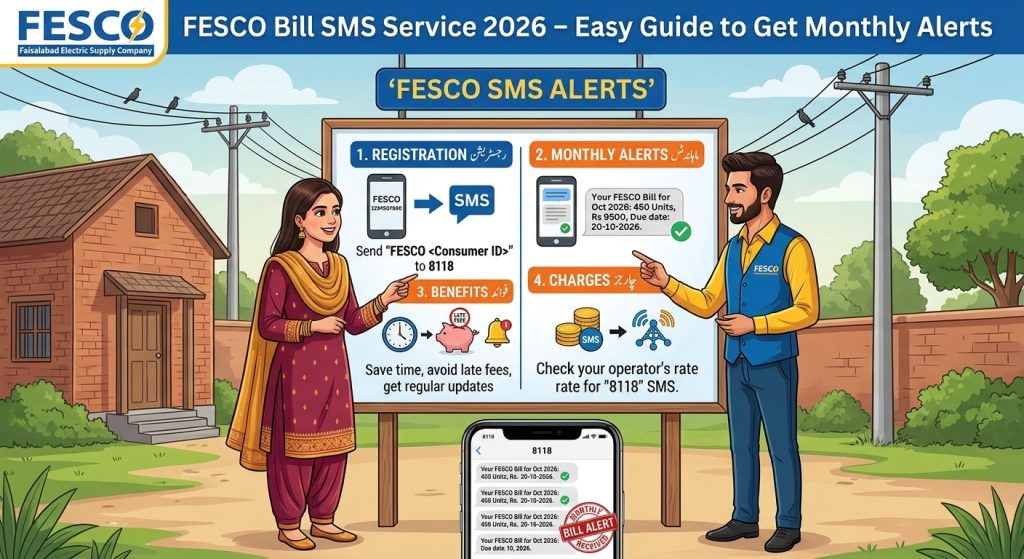
The FESCO Bill SMS Service is designed to help electricity consumers receive billing information on a registered mobile number. Instead of relying only on a printed bill, consumers can use available SMS registration facilities to receive relevant notifications.
FESCO’s official website lists an SMS Service Registration Form and a separate CNIC/Mobile Number Registration and Update facility under its electronic services. You can find these options on the official FESCO e-Services page.
Depending on the service and available notifications, SMS alerts can help you keep track of your bill and remember to check the payable amount and due date.
Benefits of FESCO Bill SMS Alerts
Registering your mobile number for available billing alerts can make managing your electricity account easier.
1. Stay Informed About Your Monthly Bill
SMS notifications can help you keep track of billing information without depending entirely on a paper bill. You can then check the complete bill online to review the amount, units consumed, and other charges.
2. Reduce the Risk of Missing a Due Date
When you receive a bill notification, you have a reminder to check your payment deadline. Paying attention to the due date may help you avoid late payment charges.
3. Convenient Access to Billing Information
A registered mobile number gives you a convenient way to receive service notifications. You can use your phone to check the latest bill information and plan your monthly expenses.
4. Better Household Budget Planning
Electricity costs can change from month to month because of consumption, tariffs, taxes, and adjustments. Checking your bill regularly helps you understand these changes and plan your budget.
Important: SMS notifications are a convenience, not a replacement for checking the complete bill. Always confirm the payable amount and due date using an available official billing source.
How to Register for FESCO Bill SMS Service Online
FESCO lists an SMS registration facility on its official e-Services website. Follow these steps to locate and use the available registration option.
Step 1: Open the Official FESCO Website
Visit the FESCO e-Services page using your mobile phone or computer.
Use the official website rather than entering your personal information on an unfamiliar third-party registration page.
Step 2: Find the SMS Service Registration Form
Look for the section titled Registration and Update Forms. Select the SMS Service Registration Form if it is available.
Do not confuse this service with CNIC or mobile number registration, which may be a separate process for linking or updating consumer information.
Step 3: Keep Your Electricity Bill Ready
Before starting registration, locate your latest electricity bill. You may need your reference number, consumer details, or mobile number, depending on the form.
Enter information carefully and ensure that the details match the correct electricity connection.
Step 4: Enter Your Mobile Number
Provide the mobile number you want to use for receiving notifications. Check every digit before submitting the form.
If the form specifies a particular number format, follow its instructions. Do not assume that every registration page uses the same format.
Step 5: Submit the Registration Form
Review your details and submit the form. If the website displays a confirmation message or provides further verification instructions, follow them.
Keep any confirmation message or reference details so you can follow up if the service does not work as expected.
Step 6: Check for Confirmation
After registration, watch for a confirmation message or other status information. The time required for activation may vary.
If you do not receive confirmation, revisit the official service page or contact FESCO through its published customer-service channels to verify whether your registration was successful.
What Information Do You Need?
The information required can depend on the registration form and the type of service you select.
| Information | Why it may be needed |
|---|---|
| Electricity reference number | Identifies the relevant electricity connection |
| Mobile number | Identifies where notifications should be sent |
| Consumer details | May be required to verify or match the account |
| CNIC information | May be requested for a separate consumer registration or update process |
Only provide information requested by the official service. Never share your account password, mobile banking PIN, or one-time banking verification code to register for electricity bill notifications.
How to Check Your FESCO Bill If You Do Not Receive an SMS
If your expected notification does not arrive, you can still check your bill online.
- Open the FESCO online bill website.
- Enter the required reference number or consumer information.
- View the latest available bill.
- Check the payable amount and due date.
- Download or print a copy if needed.
This method can help you access billing information while you investigate the SMS registration issue.
Why Are You Not Receiving FESCO SMS Alerts?
There are several possible reasons why an SMS notification may not arrive.
Incorrect Mobile Number
If the mobile number entered during registration contains an error, notifications may not reach your phone. Review the registered details through the official facility.
Registration Is Incomplete
Submitting a form does not always mean that the service has been activated. Check for a confirmation message or contact FESCO to verify the registration status.
Network or Delivery Delays
Mobile network problems or temporary messaging delays may prevent a notification from arriving on time. Check your phone’s signal and SMS inbox.
Incorrect Reference Number
If the wrong electricity reference number was entered, the registration may not be linked to the intended connection. Compare the number with your latest bill.
Mobile Number Needs Updating
If you have changed your SIM or phone number, you may need to update the registered details through FESCO’s official service.
How to Update Your Registered Mobile Number
If your mobile number has changed, visit the official FESCO e-Services page and look for the CNIC/Mobile Number Registration and Update facility.
Follow the current instructions, enter the requested information, and verify that the number is associated with the correct electricity connection.
If the online facility does not allow you to make the change, contact the relevant FESCO customer service centre for guidance.
Is FESCO Bill SMS Registration Free?
Check the current terms shown on FESCO’s official registration page or confirm them with customer service before completing registration. The cost of sending a message, where SMS-based registration is offered, may depend on the mobile operator and the service’s current terms.
Be cautious of websites or individuals asking for unnecessary fees or sensitive personal information in exchange for bill alerts. Use official channels and confirm any charges before proceeding.
Tips for Managing Your FESCO Electricity Bill
SMS alerts are useful, but a few additional habits can make bill management easier.
- Save your electricity reference number in a secure place.
- Check your bill every month, even if an SMS has not arrived.
- Note the due date as soon as the bill becomes available.
- Compare units consumed with your previous bill.
- Keep payment receipts until your payment is reflected correctly.
- Update your mobile number if it changes.
- Use official FESCO channels for registration and billing questions.
These simple steps can help you avoid missing important billing information.
Frequently Asked Questions
How can I register for FESCO Bill SMS Service in 2026?
Visit the official FESCO e-Services page, find the SMS Service Registration Form, and follow the instructions provided there.
What details are needed for SMS registration?
Depending on the form, you may need your electricity reference number, mobile number, and other consumer details. Follow the current official form requirements.
Can I receive my bill information without a printed bill?
Available SMS notifications may help you access billing information. You can also use the online bill facility to view the latest available bill and check the complete details.
What should I do if my registration does not work?
Check your reference number and mobile number, look for confirmation instructions, and contact FESCO through its official customer-service channels if the issue continues.
Can I update my mobile number later?
FESCO lists a CNIC/Mobile Number Registration and Update facility on its e-Services page. Check the current instructions to determine how to update the details associated with your connection.
Conclusion
The FESCO Bill SMS Service can make monthly bill management more convenient by helping consumers stay informed about billing notifications. To get started, visit FESCO’s official e-Services page, locate the SMS registration facility, and follow its current instructions.
If you do not receive alerts, verify your registration details and check your bill online rather than waiting for a message. Keeping your contact information up to date and monitoring your due date can help you manage your electricity payments more effectively.